Kong Mesh
Introducing Kong Mesh
Applications increasingly span Kubernetes clusters, virtual machines, clouds, and data centers. As they grow, teams need a consistent way to secure service-to-service traffic, control access, and understand what happens between services.
Kong Mesh adds a proxy alongside each application. These proxies discover destinations and enforce identity, access, routing, reliability, and observability policies where application traffic flows.
A central control plane distributes configuration while application traffic remains on your network. In a multi-zone deployment, mesh-scoped zone proxies connect services across environments and provide a controlled path to external services.
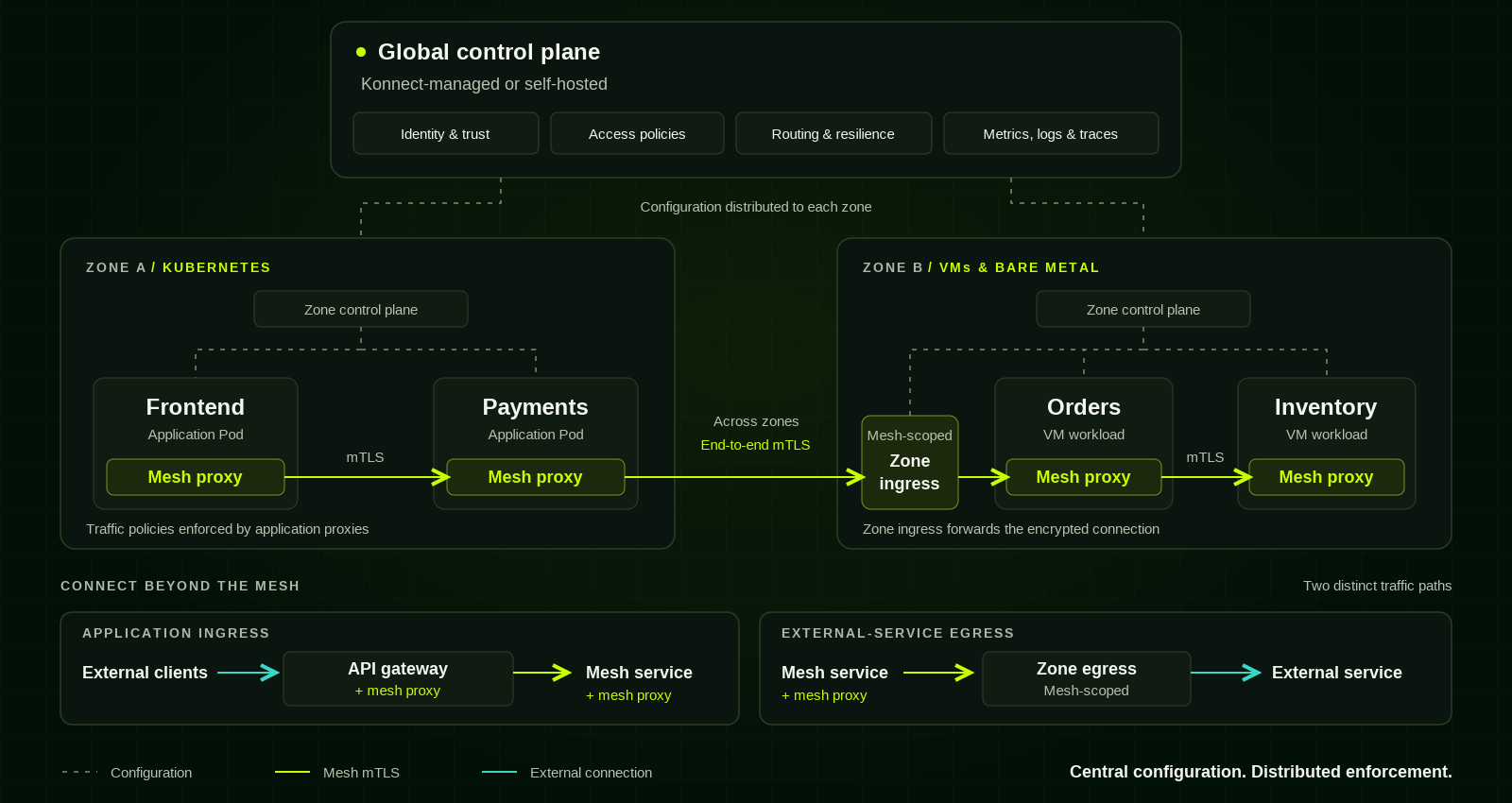



One mesh, every environment
Apply a consistent traffic model to services across Kubernetes, virtual machines, zones, and external destinations:
- Discover services within a zone
- Connect services across zones
- Bring application traffic into the mesh
- Reach services outside the mesh
Tools to manage Kong Mesh
Manage Kong Mesh resources through the interface that fits your workflow:
- Service Mesh: Create and manage Kong Mesh control planes in Konnect.
- Mesh Control Plane API: Automate control plane management through the Konnect API.
- kongctl: Inspect and configure Kong Mesh 3.x resources from the command line.
Configure your mesh
Start with the traffic behavior you need, then use the reference pages for configuration, examples, and validation.
Route traffic and handle failures
Choose destinations for requests and connections. Set timeouts, retry selected failures, and limit the impact of unhealthy destinations.
Observe service traffic
Collect metrics, access logs, and traces. Choose which proxies report telemetry and where they export it.
Secure service communication
Issue workload identities, establish trust, and allow specific callers. Configure how destinations accept encrypted connections.
Connect services across zones
Make a service available across zones and understand the proxies carrying its traffic. Apply policies at the right point in the connection.
Bring external traffic into the mesh
Connect an API gateway to mesh services and control what its workload identity can access.
Reach services outside the mesh
Define external destinations and configure their path through mesh-scoped zone egress, including access permissions and destination TLS.
Understand how Kong Mesh works
Control planes distribute configuration. Proxies handle application traffic and enforce the policies that apply to their part of the connection.
Service meshes
A service mesh moves retries, encryption, and observability out of each application and into a proxy that runs next to it.
Concepts
Find definitions for the terms used across the Kong Mesh documentation, from zones and data plane proxies to SPIFFE IDs and KRIs.
Workload identity and trust
An identity tells a proxy who is calling. Trust determines which issuers it accepts.
Services and destinations
Give applications destinations they can reach within a zone, across zones, or outside the mesh. Choose the service resource that describes where the destination runs.
Policies and traffic decisions
Select the proxies that enforce a policy, then the traffic it governs. Understand which decisions happen at the client or destination and how overlapping policies combine.
Proxies and zones
Application proxies handle workload traffic. Mesh-scoped zone ingress carries connections between zones; mesh-scoped zone egress handles the path to external services.
Operate and troubleshoot
Plan upgrades
Check upgrade order, version-specific requirements, and tested platform versions before changing a deployment.
Verify traffic behavior
Use the verification and troubleshooting sections in each reference to check identities, destinations, permissions, and proxy readiness.