Kong Context Mesh
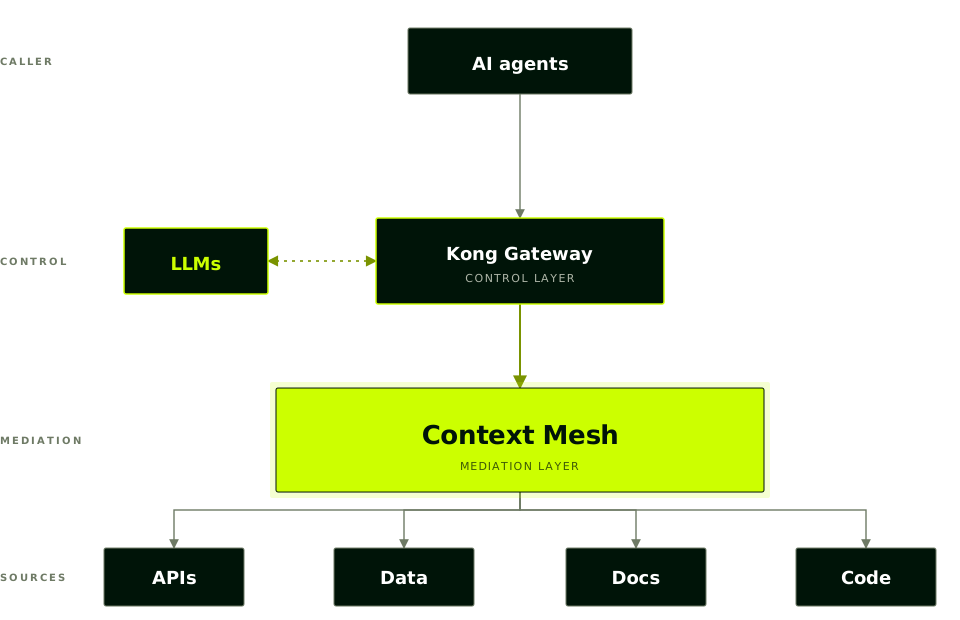
AI agents are only as good as the context they can reach. Context Mesh exposes REST APIs and existing MCP servers to AI agents as a single Code Mode MCP server.
Standard MCP tool calling doesn’t scale: every tool definition and every intermediate result burns tokens as they flow through the model. Code Mode removes that ceiling: agents can use far more tools at far lower cost.
Context Mesh is the mediation layer between agents and APIs that you deploy behind Kong Gateway to complement AI Gateway.
Context Mesh is in active development. The current release supports APIs and MCP servers as source types. Additional source types are planned for future releases.
Why Context Mesh?
Context Mesh is designed to make enterprise APIs and MCP servers usable by AI agents without adding integration complexity to your teams.
- One agent, many sources: Aggregate sources (OpenAPI specs, existing MCP servers) into a single source of truth for agents.
- Traffic stays on Kong: Because each MCP server runs on a Konnect control plane, agent calls to your APIs pass through Kong and can be governed with the plugins you already use.
Code Mode MCP servers
Context Mesh generates MCP servers in Code Mode, a configuration that exposes an API as a single SDK-like interface rather than one tool per operation.
A common pattern for MCP servers generated from an OpenAPI spec is to map each API operation to a separate tool. For an API with dozens or hundreds of endpoints, the agent’s tool list grows past what the model can reason about, and tool selection degrades.
A Code Mode server exposes the API as a programmatic interface that the agent calls by writing short code snippets against it. The agent works at the SDK level instead of picking between many similar tools. This scales to large API surfaces without flooding the model’s context, and lets an agent use your API without prior training on it.
Code Mode eliminates intermediate tool invocations by allowing agents to write and execute API calls as code. Instead of streaming every operation through the model, Code Mode returns only the final result to the context window. This reduces token consumption by ~99% (from ~120,000 tokens to ~1,200 tokens) while maintaining full observability of the workflow.
Get started
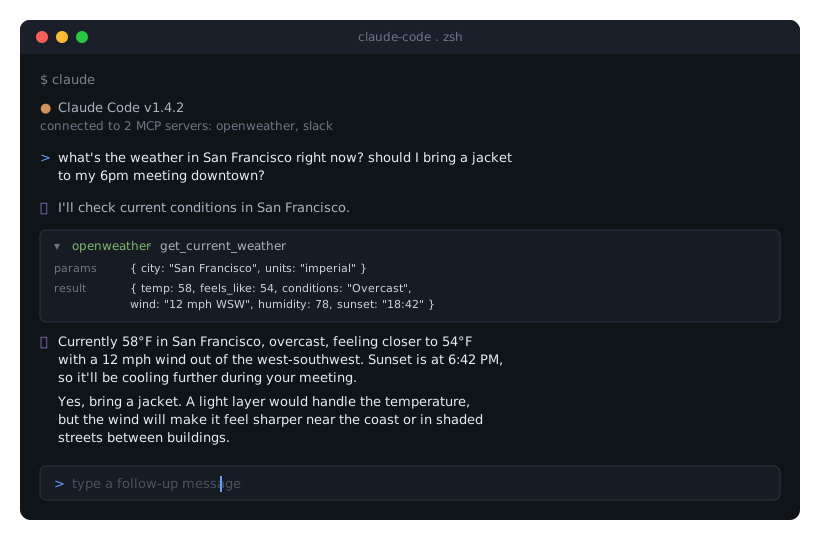
Walk through creating a Code Mode MCP server from an OpenAPI specification, deploying it, and calling it from an MCP client.
Common usage patterns
What an agent can do depends on the sources you add to Context Mesh.
When you create a Context Mesh Code Mode MCP server, you can choose to create your MCP server from the following:
- Expose a single internal API
- Compose multiple APIs
- Combine APIs with existing MCP servers
You must manually add MCP servers using their upstream URL. You cannot use AI Gateway MCP servers.
If you’re adding one or many APIs to your Code Mode MCP server, you can either upload a OpenAPI Specification (OAS) v3.0 file for each API or add them directly from APIs that you already have in Catalog.
Deploying a Context Mesh MCP server
To deploy a Context Mesh MCP server, configure its source APIs and MCP servers, then create the MCP server and map it to a Kong Gateway control plane. When you create it, you choose how Kong Operator manages the underlying Kubernetes workload. Basic mode uses its preconfigured defaults, and advanced mode hands the deployment over to you:
| Capability | Basic mode (default) | Advanced mode Tech Preview |
|---|---|---|
| Initial deployment created for you | Supported | Not supported |
| Deployment managed by Konnect after creation | Supported | Supported |
| Customize replica count and CPU and memory resources | Not supported | Supported |
| Set custom labels and annotations on the deployment | Not supported | Supported |
| MCP server code managed by Konnect | Supported | Supported |
You can switch an existing MCP server between basic and advanced mode.
Either way, Kong Gateway creates a Gateway Service entity for your MCP server, named something like mcpserver-98dd0356.
This lets you apply plugins and other governing strategies to your Context Mesh MCP server.
For an end-to-end walkthrough, see Deploy an MCP server with Context Mesh and Kong Operator.
Context Mesh limitations
Context Mesh MCP servers can only be linked to and proxied with Kong Gateway control planes that were provisioned with Kong Operator.
Frequently asked questions
Is Context Mesh different from the AI Gateway MCP Server?
Yes. You configure a AI Gateway MCP Server by hand, tool by tool, with full governance (auth, ACLs, rate limiting) built into that configuration. AI Gateway MCP Servers don’t support Code Mode.
Context Mesh MCP servers use Code Mode instead: rather than declaring tools manually, Context Mesh generates the MCP server directly from each source’s existing configuration, so you can combine multiple types of sources into a single context surface for agents.
In short: AI Gateway MCP Servers are built for fine-grained control over one endpoint. Context Mesh is built for assembling different sources quickly, as a Code Mode MCP server.
What type of source can I use with Context Mesh?
Context Mesh supports two source types: REST APIs, added as OpenAPI specifications, and existing MCP servers. You can mix both in the same Context Mesh MCP server.