Import an API specification into an API Collection in Insomnia

Uses: Insomnia
TL;DR

In your Insomnia workspace, click Import, choose between importing from a file, a URL, or your clipboard, and click Scan. Insomnia creates an API Collection and puts the spec in its Spec tab.

Prerequisites

Download and install Insomnia.

You need to have an API specification in one of the following formats:

  • Insomnia
  • Postman v2
  • HAR
  • OpenAPI (versions 3.0, 3.1)
  • Swagger
  • WSDL
  • cURL

Select a specification

  1. In your workspace, click Import.
  2. Select the source of the import: File, URL, cURL, or Clipboard.
  3. Based on the source you selected, either choose a file, enter a URL, or paste your API specification.

Insomnia automatically detects cURL commands and converts them into requests.

Scan the specification

  1. Click Scan.
  2. Review the resources to import.
  3. Click Import.

Insomnia creates an API Collection for your specification and puts the specification in its Spec tab.

Validate

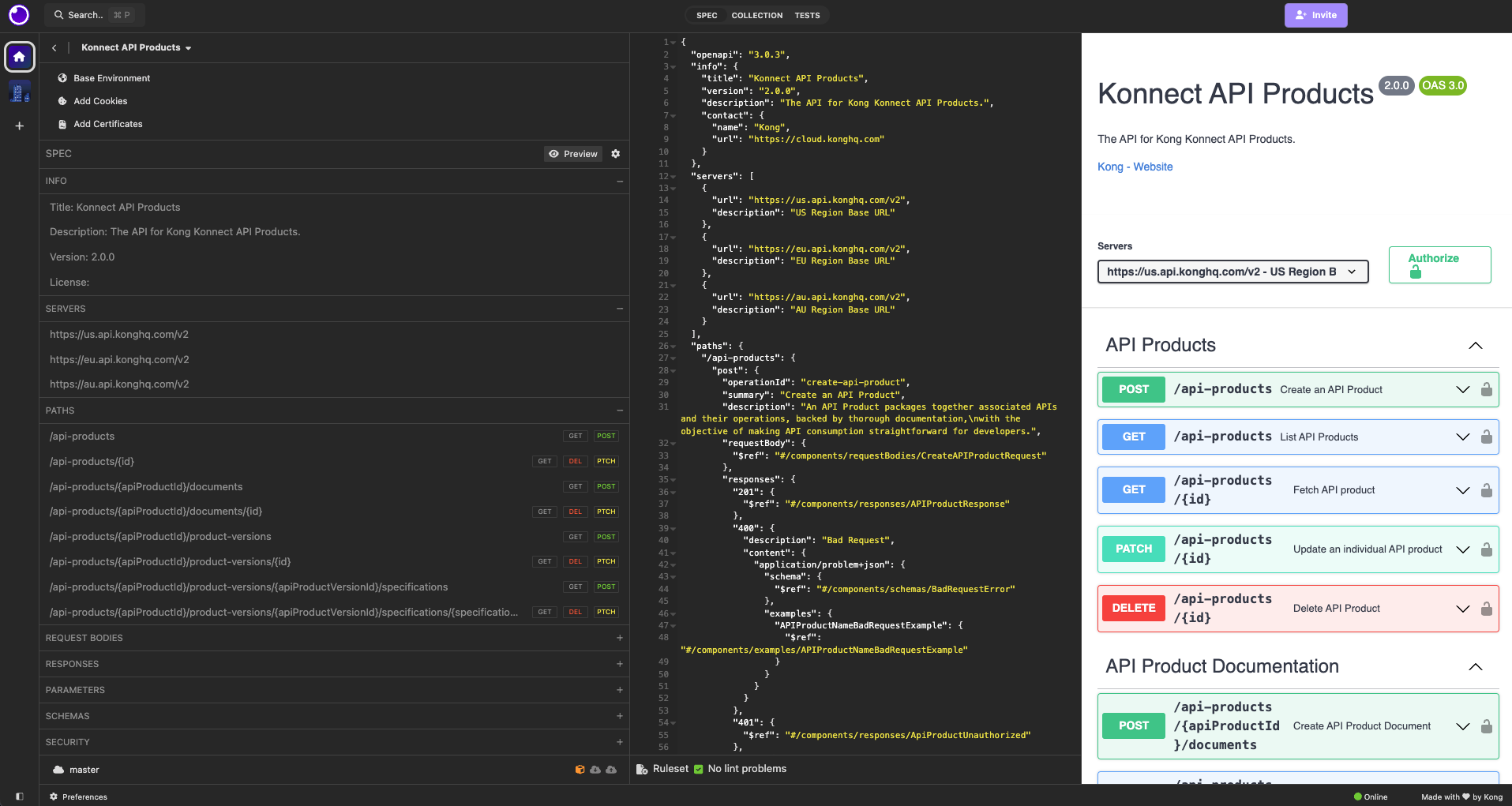
Open the imported API Collection and click the Spec tab. You can see three different views:

  • On the left you can see an overview of the specification, with sections that you can expand. You can click the different elements to highlight them in the specification.
  • In the middle, you can see the specification as it was imported. You can also see if there are any warnings or errors.
  • On the right, you can see a preview of the rendering of the specification.

API spec in the Spec tab of an API Collection

To turn the specification into requests you can send, click Generate and select “Requests”. For more information, see Generate requests from an API spec.

FAQs

Yes. For Insomnia to autodetect that your spec is in GraphQL format, the path must be /graphql, the method must be POST, the request body must be application/json and must contain a property query with the type string, and the response body must be application/json.

Insomnia creates an API Collection for the spec and puts the spec in the Spec tab of that API Collection. In Insomnia 13.2 and earlier, this was a separate workspace type called a design document. For more details, see API Collections.

Help us make these docs great!

Kong Developer docs are open source. If you find these useful and want to make them better, contribute today!