---
title: "Kong Gateway"
description: This page is an introduction to Kong Gateway.
url: "/gateway/"
canonical_url: "/gateway/"
content_type: landing_page
products:
- Kong Gateway
canonical: true
works_on:
- on-prem
- konnect
---
# Kong Gateway
API gateway built for hybrid and multi-cloud, optimized for microservices and distributed architectures
## Introducing Kong Gateway
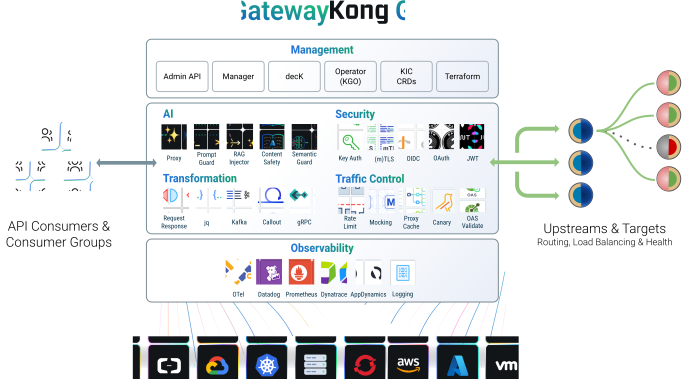
Kong Gateway is a lightweight, fast, and flexible cloud-native API gateway. An API gateway is a reverse proxy that lets you manage, configure, and route requests to your APIs.
Kong Gateway runs in front of any RESTful API and can be extended through modules and plugins.
It's designed to run on decentralized architectures, including hybrid-cloud and multi-cloud deployments.
 ## Install Kong Gateway
You can use the [quickstart script](https://get.konghq.com/quickstart) to get an instance of Kong Gateway running almost instantly:
#### Konnect
This command requires a [Konnect Access Token](https://cloud.konghq.com/global/account/tokens).
```sh
curl -Ls https://get.konghq.com/quickstart | bash -s -- -k $KONNECT_TOKEN
```
The script creates a Control Plane in Konnect and deploys a local Data Plane using Docker.
All licensing is handled automatically by Konnect.
#### On-Prem
You must provide your Kong Gateway license in the `KONG_LICENSE_DATA` environment variable.
```sh
curl -Ls https://get.konghq.com/quickstart | bash -s -- -e $KONG_LICENSE_DATA
```
This script sets up two Docker containers: an Enterprise Gateway instance, and a
PostgreSQL database.
Pass the `-- -h` option to the script to see all possible configuration options, including how to pass a license
to the script, switch to an open-source Gateway image, [enable RBAC](/gateway/entities/rbac/#enable-rbac), and more.
Visit the [Gateway install page](/gateway/install/) for all other installation options.
## More ways to get started
### Try the Getting Started guide
Learn how to use Kong Gateway on Konnect or on-prem
### Install on your platform
Set up Kong Gateway on any supported platform
### Choose a deployment mode
Learn about the different ways that you can deploy Kong Gateway in production: traditional mode, hybrid mode, and DB-less
## API Gateway in Konnect
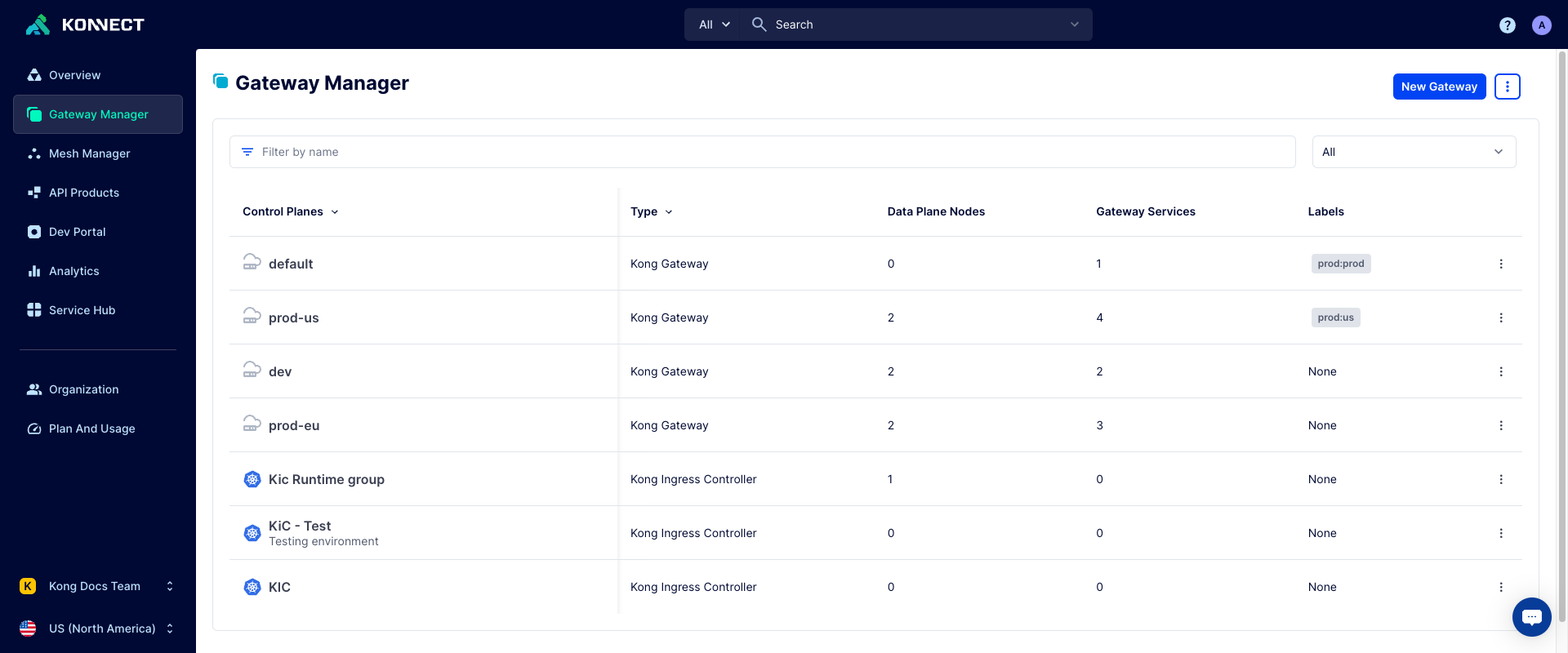
Konnect lets you catalog, connect to, and monitor
the status of all API Gateway control planes (CPs) and data plane nodes (DPs) in one place.
Key features include:
- Manage control planes and their configurations
- Deploy and monitor data plane nodes
- Use fully-managed cloud gateways or self-hosted infrastructure
- Ensure high availability, security, and scalability for your API traffic
## Core concepts in Kong Gateway
### Kong Gateway entities
Entities are the building blocks make up the Kong API Gateway ecosystem.
This includes Services, Routes, Consumers, and more.
[Learn about Kong Gateway entities](/gateway/entities/)
### Kong Gateway configuration
The Kong Gateway configuration file `kong.conf` can be used to configure
individual properties of your Kong Gateway instance.
[See all the configuration options](/gateway/configuration/)
### Kong Plugin Hub
Extend your Gateway with powerful plugins
[View all available plugins](/plugins/)
## Deployment checklist
* [Deployment topologies](/gateway/deployment-topologies/): Learn about the different ways to deploy Kong Gateway.
* [Hosting options](/gateway/topology-hosting-options/): Decide where you want to host your Data Plane nodes, and whether you want Kong to host them or host them yourself.
* [Resource sizing guidelines](/gateway/resource-sizing-guidelines/): Review Kong's recommended resource allocation guidelines.
* [Securing Kong Gateway](/gateway/security/): Secure every aspect of your deployment, from access control, to mTLS, to secret management in vaults.
* [Performance testing benchmarks](/gateway/performance/benchmarks/): See the performance benchmark results for every Kong Gateway version.
* [Kong Manager](/gateway/kong-manager/): Set up the GUI for Kong Gateway.
## Tools to manage Kong Gateway
* [decK](/deck/): Manage Kong Gateway configuration through declarative state files
* [Terraform](/terraform/): Manage infrastructure as code and automated deployments to streamline setup and configuration of Konnect and Kong Gateway
* [KIC](/kubernetes-ingress-controller/): Manage ingress traffic and routing rules for your services
* [Kong Gateway Admin API](/api/gateway/admin-ee/): Manage on-prem Kong Gateway entities via an API
* [Control Plane Config API](/api/konnect/control-planes-config/): Manage Kong Gateway entities within Konnect control planes via an API
## Key functionality
### AI Gateway
AI Gateway is a powerful set of AI features built on top of Kong Gateway,
designed to help developers and organizations effectively adopt AI quickly and securely.
[Start using AI Gateway](/ai-gateway/)
### Authentication
Authentication is the process of verifying that a requester has permissions to access a resource.
Kong Gateway has a library of plugins that support the most widely used methods of API gateway authentication.
[Learn about Kong Gateway authentication methods](/gateway/authentication/)
### Rate limiting in Kong Gateway
Kong Gateway can be configured to apply rate limiting rules on incoming traffic.
This includes rate limiting by IP, API key, Consumer, and more.
[Add Rate Limiting with Kong Gateway](/gateway/rate-limiting/)
### Analytics & observability
Understanding the state of your API gateway system is critical to providing reliable API-based systems.
There are many monitoring and alerting plugins available that can integrate with Kong Gateway.
[Start monitoring your Kong Gateway](/plugins/?category=analytics-monitoring)
### Securing Kong Gateway
Kong Gateway provides security features such as authorization, sensitive data encryption,
and logs that you can use to secure your Kong Gateway deployments.
[Secure your Kong Gateway deployment](/gateway/security/)
### Load balancing
Load balancing traffic across your upstream services is vital for ensuring
high availability, scalability, and reliability of your ecosystem.
Kong Gateway provides multiple ways to load balance across upstream services,
along with health checks and circuit breakers to ensure target health.
[Choose your load balancing methods](/gateway/load-balancing/)
## Key references
### API reference
Explore the reference documentation for all Kong Gateway APIs
[Kong API reference](/api/gateway/admin-ee/)
### Upgrade or migrate Kong Gateway
Upgrade to a newer version, migrate from OSS to Enterprise, or move to Konnect
[See upgrade and migration options](/gateway/upgrade/)
### Changelog
Changelog for supported Kong Gateway Enterprise versions
[See changelog](/gateway/changelog/)
## Support policies
### Kong Gateway version support policy
The Kong Gateway version support policy outlines the Kong Gateway
versioning scheme and version lifecycle, from release to sunset support.
[View the version support policy](/gateway/version-support-policy/)
### Kong Gateway third-party dependencies
This reference lists all of the tested and supported versions of Kong Gateway's third-party dependencies.
[View the supported third-party dependencies](/gateway/third-party-support/)
### Kong vulnerability patching process
Learn how Kong handles vulnerabilities or potential vulnerabilities in Kong Gateway or
third-party code, and how to report any security issues.
[View the vulnerability policy](/gateway/vulnerabilities/)
## Frequently asked questions
- I'm getting connection errors between the control plane and data plane. What should I check?
You may need to add specific hostnames or IP addresses to an allowlist so that communication can reach Konnect uninterrupted.
See [Networking in Konnect](/konnect-platform/network/) for the required ports and hostnames.
## How-to Guides
* [Map API Gateway Services in Catalog Classic](/how-to/map-api-gateway-resources/)
* [Configure an AWS managed cache for a Dedicated Cloud Gateway control plane group](/dedicated-cloud-gateways/aws-managed-cache-control-plane-group/)
* [Configure an AWS managed cache for a Dedicated Cloud Gateway control plane](/dedicated-cloud-gateways/aws-managed-cache-control-plane/)
* [Set up an AWS resource endpoint connection](/dedicated-cloud-gateways/aws-resource-endpoints/)
* [Set up an AWS VPC peering connection](/dedicated-cloud-gateways/aws-vpc-peering/)
## Install Kong Gateway
You can use the [quickstart script](https://get.konghq.com/quickstart) to get an instance of Kong Gateway running almost instantly:
#### Konnect
This command requires a [Konnect Access Token](https://cloud.konghq.com/global/account/tokens).
```sh
curl -Ls https://get.konghq.com/quickstart | bash -s -- -k $KONNECT_TOKEN
```
The script creates a Control Plane in Konnect and deploys a local Data Plane using Docker.
All licensing is handled automatically by Konnect.
#### On-Prem
You must provide your Kong Gateway license in the `KONG_LICENSE_DATA` environment variable.
```sh
curl -Ls https://get.konghq.com/quickstart | bash -s -- -e $KONG_LICENSE_DATA
```
This script sets up two Docker containers: an Enterprise Gateway instance, and a
PostgreSQL database.
Pass the `-- -h` option to the script to see all possible configuration options, including how to pass a license
to the script, switch to an open-source Gateway image, [enable RBAC](/gateway/entities/rbac/#enable-rbac), and more.
Visit the [Gateway install page](/gateway/install/) for all other installation options.
## More ways to get started
### Try the Getting Started guide
Learn how to use Kong Gateway on Konnect or on-prem
### Install on your platform
Set up Kong Gateway on any supported platform
### Choose a deployment mode
Learn about the different ways that you can deploy Kong Gateway in production: traditional mode, hybrid mode, and DB-less
## API Gateway in Konnect
Konnect lets you catalog, connect to, and monitor
the status of all API Gateway control planes (CPs) and data plane nodes (DPs) in one place.
Key features include:
- Manage control planes and their configurations
- Deploy and monitor data plane nodes
- Use fully-managed cloud gateways or self-hosted infrastructure
- Ensure high availability, security, and scalability for your API traffic

## Core concepts in Kong Gateway
### Kong Gateway entities
Entities are the building blocks make up the Kong API Gateway ecosystem.
This includes Services, Routes, Consumers, and more.
[Learn about Kong Gateway entities](/gateway/entities/)
### Kong Gateway configuration
The Kong Gateway configuration file `kong.conf` can be used to configure
individual properties of your Kong Gateway instance.
[See all the configuration options](/gateway/configuration/)
### Kong Plugin Hub
Extend your Gateway with powerful plugins
[View all available plugins](/plugins/)
## Deployment checklist
* [Deployment topologies](/gateway/deployment-topologies/): Learn about the different ways to deploy Kong Gateway.
* [Hosting options](/gateway/topology-hosting-options/): Decide where you want to host your Data Plane nodes, and whether you want Kong to host them or host them yourself.
* [Resource sizing guidelines](/gateway/resource-sizing-guidelines/): Review Kong's recommended resource allocation guidelines.
* [Securing Kong Gateway](/gateway/security/): Secure every aspect of your deployment, from access control, to mTLS, to secret management in vaults.
* [Performance testing benchmarks](/gateway/performance/benchmarks/): See the performance benchmark results for every Kong Gateway version.
* [Kong Manager](/gateway/kong-manager/): Set up the GUI for Kong Gateway.
## Tools to manage Kong Gateway
* [decK](/deck/): Manage Kong Gateway configuration through declarative state files
* [Terraform](/terraform/): Manage infrastructure as code and automated deployments to streamline setup and configuration of Konnect and Kong Gateway
* [KIC](/kubernetes-ingress-controller/): Manage ingress traffic and routing rules for your services
* [Kong Gateway Admin API](/api/gateway/admin-ee/): Manage on-prem Kong Gateway entities via an API
* [Control Plane Config API](/api/konnect/control-planes-config/): Manage Kong Gateway entities within Konnect control planes via an API
## Key functionality
### AI Gateway
AI Gateway is a powerful set of AI features built on top of Kong Gateway,
designed to help developers and organizations effectively adopt AI quickly and securely.
[Start using AI Gateway](/ai-gateway/)
### Authentication
Authentication is the process of verifying that a requester has permissions to access a resource.
Kong Gateway has a library of plugins that support the most widely used methods of API gateway authentication.
[Learn about Kong Gateway authentication methods](/gateway/authentication/)
### Rate limiting in Kong Gateway
Kong Gateway can be configured to apply rate limiting rules on incoming traffic.
This includes rate limiting by IP, API key, Consumer, and more.
[Add Rate Limiting with Kong Gateway](/gateway/rate-limiting/)
### Analytics & observability
Understanding the state of your API gateway system is critical to providing reliable API-based systems.
There are many monitoring and alerting plugins available that can integrate with Kong Gateway.
[Start monitoring your Kong Gateway](/plugins/?category=analytics-monitoring)
### Securing Kong Gateway
Kong Gateway provides security features such as authorization, sensitive data encryption,
and logs that you can use to secure your Kong Gateway deployments.
[Secure your Kong Gateway deployment](/gateway/security/)
### Load balancing
Load balancing traffic across your upstream services is vital for ensuring
high availability, scalability, and reliability of your ecosystem.
Kong Gateway provides multiple ways to load balance across upstream services,
along with health checks and circuit breakers to ensure target health.
[Choose your load balancing methods](/gateway/load-balancing/)
## Key references
### API reference
Explore the reference documentation for all Kong Gateway APIs
[Kong API reference](/api/gateway/admin-ee/)
### Upgrade or migrate Kong Gateway
Upgrade to a newer version, migrate from OSS to Enterprise, or move to Konnect
[See upgrade and migration options](/gateway/upgrade/)
### Changelog
Changelog for supported Kong Gateway Enterprise versions
[See changelog](/gateway/changelog/)
## Support policies
### Kong Gateway version support policy
The Kong Gateway version support policy outlines the Kong Gateway
versioning scheme and version lifecycle, from release to sunset support.
[View the version support policy](/gateway/version-support-policy/)
### Kong Gateway third-party dependencies
This reference lists all of the tested and supported versions of Kong Gateway's third-party dependencies.
[View the supported third-party dependencies](/gateway/third-party-support/)
### Kong vulnerability patching process
Learn how Kong handles vulnerabilities or potential vulnerabilities in Kong Gateway or
third-party code, and how to report any security issues.
[View the vulnerability policy](/gateway/vulnerabilities/)
## Frequently asked questions
- I'm getting connection errors between the control plane and data plane. What should I check?
You may need to add specific hostnames or IP addresses to an allowlist so that communication can reach Konnect uninterrupted.
See [Networking in Konnect](/konnect-platform/network/) for the required ports and hostnames.
## How-to Guides
* [Map API Gateway Services in Catalog Classic](/how-to/map-api-gateway-resources/)
* [Configure an AWS managed cache for a Dedicated Cloud Gateway control plane group](/dedicated-cloud-gateways/aws-managed-cache-control-plane-group/)
* [Configure an AWS managed cache for a Dedicated Cloud Gateway control plane](/dedicated-cloud-gateways/aws-managed-cache-control-plane/)
* [Set up an AWS resource endpoint connection](/dedicated-cloud-gateways/aws-resource-endpoints/)
* [Set up an AWS VPC peering connection](/dedicated-cloud-gateways/aws-vpc-peering/)