---
title: Dev Portal
description: Manage API publishing, developer self-service, and documentation with
Konnect Dev Portal.
url: "/dev-portal/"
canonical_url: "/dev-portal/"
content_type: landing_page
products:
- Dev Portal
canonical: true
---
# Dev Portal
Empower API consumers with self-service API documentation and developer tools
> [Review domain breaking changes for Dev Portal v3](/dev-portal/breaking-changes/)
The Konnect Dev Portal is a customizable website for developers to locate, access, and consume API services.
It enables developers to browse and search API documentation, try API operations, and manage their own credentials.
The Portal supports both internal and external APIs through flexible deployment options.
Dev Portal APIs allow you to publish APIs using OpenAPI or AsyncAPI specifications and Markdown documentation.
You can provide highly customizable content at both the site and API level to offer additional context to developers.
[Create a Dev Portal in Konnect](https://cloud.konghq.com/portals/create)
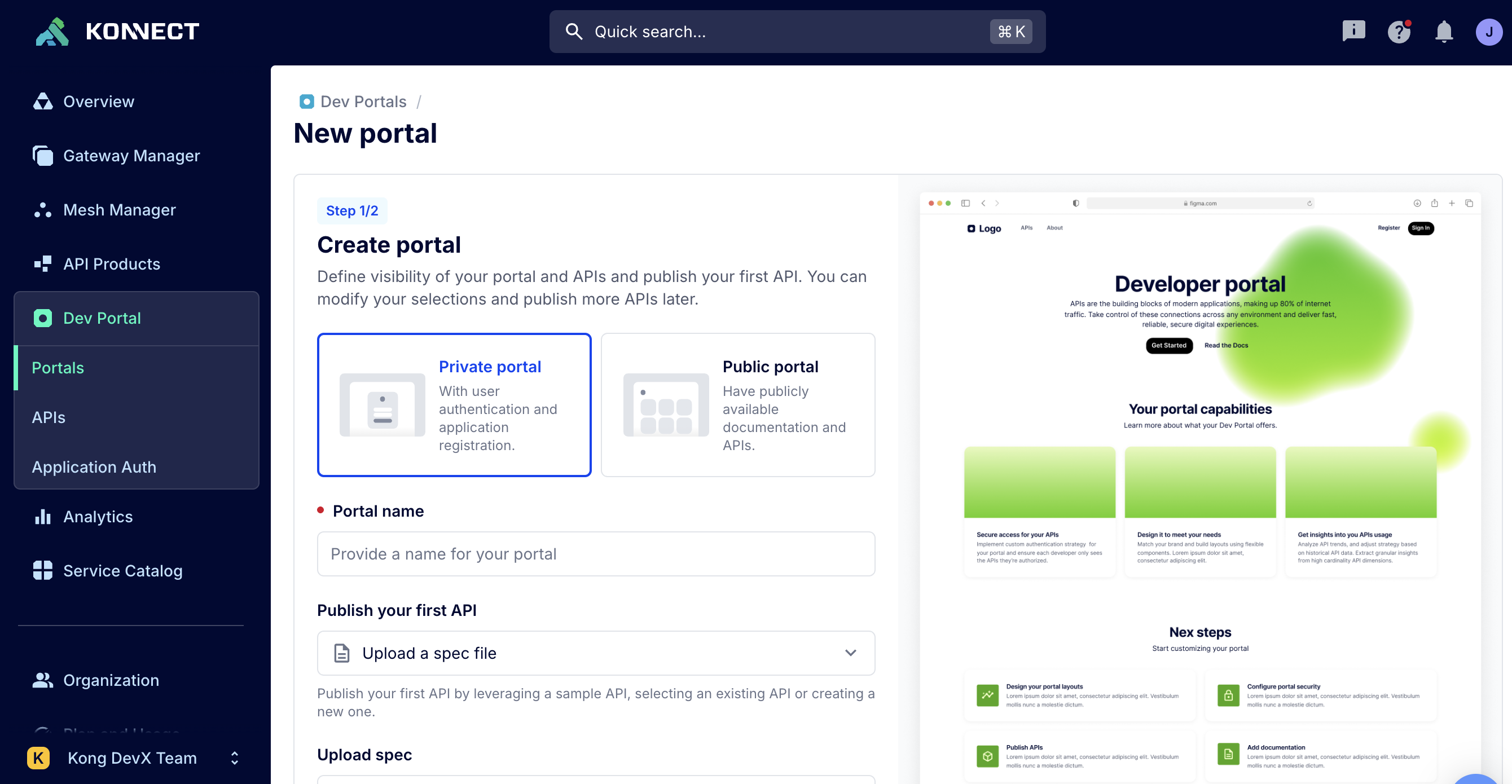
## Deployment options
 **Internal Dev Portal**
Designed for internal developer enablement and productivity.
* Private visibility with authentication enabled
* Publish internal-only APIs
* Use Pages for API standards and training
* Secure access via IdP and Teams
**Internal Dev Portal**
Designed for internal developer enablement and productivity.
* Private visibility with authentication enabled
* Publish internal-only APIs
* Use Pages for API standards and training
* Secure access via IdP and Teams
 **Partner Dev Portal**
Ideal for exposing APIs to trusted external developers.
* Private or public visibility with auth enabled
* Self-service registration and API key provisioning
* Restrict access via RBAC and visibility settings
* Brand and document your partner use cases
**Partner Dev Portal**
Ideal for exposing APIs to trusted external developers.
* Private or public visibility with auth enabled
* Self-service registration and API key provisioning
* Restrict access via RBAC and visibility settings
* Brand and document your partner use cases
 **Public Dev Portal**
Open your APIs to the broader developer community.
* Public visibility without authentication
* Publish APIs suited to general audiences
* Build custom landing pages and SEO-optimized docs
## Get started
### Define Dev Portal teams and roles
Before you can start using your Dev Portal, a Konnect or Dev Portal admin must assign users to Konnect teams and roles. This allows Konnect users to access their respective features in Dev Portal.
* [Pre-defined Dev Portal teams](/konnect-platform/teams-and-roles/#predefined-teams)
* [Dev Portal teams for common use cases](/konnect-platform/teams-and-roles/#dev-portal-custom-teams)
* [Catalog API roles](/konnect-platform/teams-and-roles/#catalog-apis)
* [Dev Portal roles](/konnect-platform/teams-and-roles/#dev-portal)
### Create an API catalog
Create and publish APIs to Dev Portal manually or with automation. Discover and govern APIs from third-parties with Catalog.
* [With the Konnect API](/how-to/automate-api-catalog/)
* [With Terraform](/how-to/automate-api-catalog-with-terraform/)
* [Create and publish APIs](/catalog/apis/)
* [Create API packages](/catalog/api-packaging/)
* [Discover and govern APIs](/how-to/discover-and-govern-apis-with-service-catalog/)
### Customize Dev Portal
Customize Dev Portal pages, domains, and appearance.
* [About Dev Portal customization](/dev-portal/customizations/dev-portal-customizations/)
* [Pages and content](/dev-portal/pages-and-content/)
* [VS Code extension](https://marketplace.visualstudio.com/items?itemName=konghq.vscode-konnect-dev-portal-toolkit)
* [Custom domains](/dev-portal/custom-domains/)
* [Dev Portal settings](/dev-portal/portal-settings/)
### Developer self-service
Enable self-service registration flows for developers and applications using authentication strategies and Konnect application auth.
* [Self-service developer and app registration](/dev-portal/self-service/)
* [Developer sign-up](/dev-portal/developer-signup/)
* [Developer and application approvals](/dev-portal/self-service/#developer-and-application-approvals)
* [Authentication strategies](/dev-portal/auth-strategies/)
* [Developer RBAC](/dev-portal/developer-rbac/)
## Developer authentication and access
### Access and authentication settings
Security settings help you configure visibility and access control for developers accessing your Dev Portal.
### SSO
Set up SSO for the Konnect Dev Portal using OpenID Connect (OIDC) or SAML.
### IdP team mappings
Map existing developer teams from a third-party identity provider (IdP) and their permissions to elements in a Konnect Dev Portal.
### Developer RBAC
Learn about pre-defined developer teams and roles for RBAC.
## Dev Portal analytics
In Dev Portal, you can view both analytics for developer applications as well as platform-wide analytics for all Dev Portals.
For more information, see [Dev Portal analytics](/dev-portal/analytics/).
## Migrate from classic Dev Portal (v2)
With the GA release of the new Dev Portal (v3) in June 2025, you can migrate from classic Dev Portals (v2) to the new Dev Portal.
See the [migration guide](/dev-portal/v2-migration/) to learn how to migrate from the classic Dev Portal (v2) to the new Dev Portal (v3).
## Dev Portal integrations
### Google Analytics
Learn how to configure Google Analytics 4 to track events on your Konnect Dev Portal.
### Google Tag Manager
Learn how to add the Google Tag Manager script to all pages of your Konnect Dev Portal.
### EqualWeb
Learn how to add the EqualWeb accessibility widget to your Dev Portal.
## References
### Dev Portal audit logs
Learn about what events are logged in Dev Portal logs.
### Dev Portal v3 breaking changes
Review breaking changes from Dev Portal v3 beta to general release.
## Frequently asked questions
- How do I view Dev Portal documentation for Kong Gateway 3.4?
Contact your account manager for Kong Gateway 3.4 documentation.
- How many Dev Portals can I create?
There is a soft limit of four Dev Portals per Konnect org.
Reach out to your Kong customer success team to increase this limit.
- I'm getting connection errors when accessing my Dev Portal. What should I check?
You may need to add specific hostnames or IP addresses to an allowlist so that communication can reach Konnect uninterrupted.
See [Networking in Konnect](/konnect-platform/network/) for the required ports and hostnames.
**Public Dev Portal**
Open your APIs to the broader developer community.
* Public visibility without authentication
* Publish APIs suited to general audiences
* Build custom landing pages and SEO-optimized docs
## Get started
### Define Dev Portal teams and roles
Before you can start using your Dev Portal, a Konnect or Dev Portal admin must assign users to Konnect teams and roles. This allows Konnect users to access their respective features in Dev Portal.
* [Pre-defined Dev Portal teams](/konnect-platform/teams-and-roles/#predefined-teams)
* [Dev Portal teams for common use cases](/konnect-platform/teams-and-roles/#dev-portal-custom-teams)
* [Catalog API roles](/konnect-platform/teams-and-roles/#catalog-apis)
* [Dev Portal roles](/konnect-platform/teams-and-roles/#dev-portal)
### Create an API catalog
Create and publish APIs to Dev Portal manually or with automation. Discover and govern APIs from third-parties with Catalog.
* [With the Konnect API](/how-to/automate-api-catalog/)
* [With Terraform](/how-to/automate-api-catalog-with-terraform/)
* [Create and publish APIs](/catalog/apis/)
* [Create API packages](/catalog/api-packaging/)
* [Discover and govern APIs](/how-to/discover-and-govern-apis-with-service-catalog/)
### Customize Dev Portal
Customize Dev Portal pages, domains, and appearance.
* [About Dev Portal customization](/dev-portal/customizations/dev-portal-customizations/)
* [Pages and content](/dev-portal/pages-and-content/)
* [VS Code extension](https://marketplace.visualstudio.com/items?itemName=konghq.vscode-konnect-dev-portal-toolkit)
* [Custom domains](/dev-portal/custom-domains/)
* [Dev Portal settings](/dev-portal/portal-settings/)
### Developer self-service
Enable self-service registration flows for developers and applications using authentication strategies and Konnect application auth.
* [Self-service developer and app registration](/dev-portal/self-service/)
* [Developer sign-up](/dev-portal/developer-signup/)
* [Developer and application approvals](/dev-portal/self-service/#developer-and-application-approvals)
* [Authentication strategies](/dev-portal/auth-strategies/)
* [Developer RBAC](/dev-portal/developer-rbac/)
## Developer authentication and access
### Access and authentication settings
Security settings help you configure visibility and access control for developers accessing your Dev Portal.
### SSO
Set up SSO for the Konnect Dev Portal using OpenID Connect (OIDC) or SAML.
### IdP team mappings
Map existing developer teams from a third-party identity provider (IdP) and their permissions to elements in a Konnect Dev Portal.
### Developer RBAC
Learn about pre-defined developer teams and roles for RBAC.
## Dev Portal analytics
In Dev Portal, you can view both analytics for developer applications as well as platform-wide analytics for all Dev Portals.
For more information, see [Dev Portal analytics](/dev-portal/analytics/).
## Migrate from classic Dev Portal (v2)
With the GA release of the new Dev Portal (v3) in June 2025, you can migrate from classic Dev Portals (v2) to the new Dev Portal.
See the [migration guide](/dev-portal/v2-migration/) to learn how to migrate from the classic Dev Portal (v2) to the new Dev Portal (v3).
## Dev Portal integrations
### Google Analytics
Learn how to configure Google Analytics 4 to track events on your Konnect Dev Portal.
### Google Tag Manager
Learn how to add the Google Tag Manager script to all pages of your Konnect Dev Portal.
### EqualWeb
Learn how to add the EqualWeb accessibility widget to your Dev Portal.
## References
### Dev Portal audit logs
Learn about what events are logged in Dev Portal logs.
### Dev Portal v3 breaking changes
Review breaking changes from Dev Portal v3 beta to general release.
## Frequently asked questions
- How do I view Dev Portal documentation for Kong Gateway 3.4?
Contact your account manager for Kong Gateway 3.4 documentation.
- How many Dev Portals can I create?
There is a soft limit of four Dev Portals per Konnect org.
Reach out to your Kong customer success team to increase this limit.
- I'm getting connection errors when accessing my Dev Portal. What should I check?
You may need to add specific hostnames or IP addresses to an allowlist so that communication can reach Konnect uninterrupted.
See [Networking in Konnect](/konnect-platform/network/) for the required ports and hostnames.